MythScribe
A downloadable Experience for Windows
Mythscribe
A desktop writing room for AI-driven roleplay.
Mythscribe is a local, single-user app that turns the AI Horde — a volunteer-run network of GPU operators — into your own private collaborator for interactive fiction. Build a cast of characters, drop them into a world, and run scenes that branch, summarize themselves, and illustrate themselves as you go. Your stories never leave your machine.
It is free, and will stay free. If it earns a place in your writing routine and you'd like to chip in for the time that goes into it, donations are welcome — but the tool is yours regardless.
Why Mythscribe?
- You own your story. Everything — chats, characters, lore, world notes, generated images — lives in an encrypted vault on your own computer. No cloud account, no subscription, no terms of service that change every quarter.
- Safe For Work. Safety restrictions are in place to help keep your chats appropriate for work and home, with leniency on fantasy violence. As with all restrictions there are always ways to break it. Parent's discretion is advised.
- No model bill. The AI Horde runs on donated GPU time. You can use it for free with a guest key, or register a free Horde account for priority queueing.
- Built for long stories, not chat sessions. Rolling summarization keeps long arcs coherent inside an 8K context budget. The conversation branches like a tree, so you can rewind, regenerate, and explore alternate paths without losing the original.
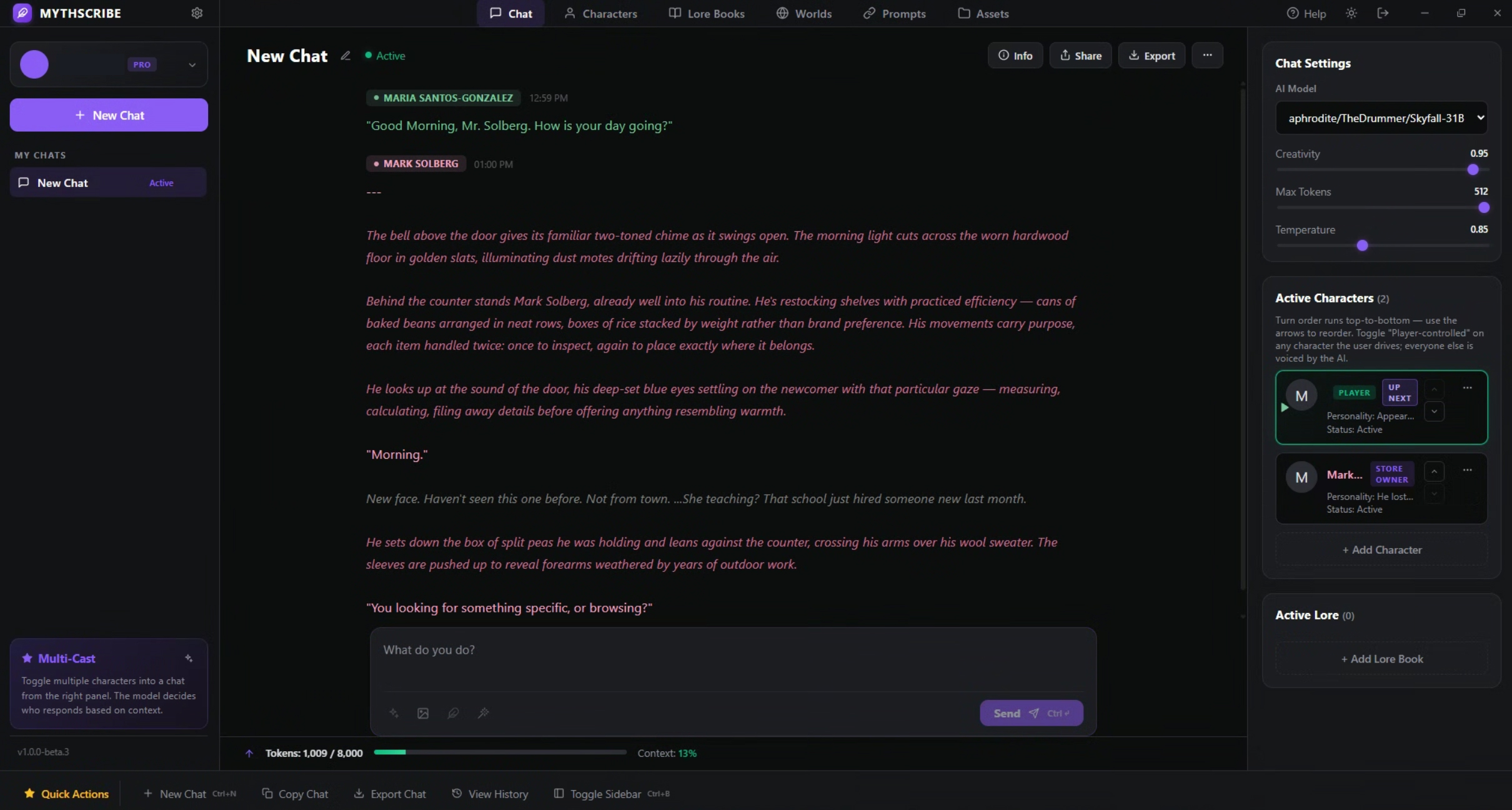
- A real cast, not one chatbot. Bring multiple characters into a scene. Let the AI play some of them, play the others yourself, and watch the turn order rotate in the way you'd expect at a tabletop.
- Illustrations on demand. Auto-generate an image for each AI reply, or hand-pick which beats deserve a portrait. Use the AI Horde's image models or plug in a Civitai key for sharper results.
- Lore that listens. Define keyword-triggered lore entries; Mythscribe sweeps them into the prompt only when they're relevant, so your worldbuilding doesn't burn context on every turn.
If you've been chatting with AI characters in a browser tab and wishing it felt more like a writing tool than a help-desk window, this is for that.
Getting Started
Install
- Download the latest
Mythscribe-x.y.z-win-x64.zip. - Unzip anywhere — Desktop, Documents, an external drive. There is no installer.
- Double-click
Mythscribe.exe.
First-launch note: Windows SmartScreen will say "Windows protected your PC." Click More info → Run anyway. This is expected for unsigned indie apps; Mythscribe does not require admin permissions and stores nothing outside your user profile.
Your encrypted data lives in %APPDATA%\Mythscribe. Back that folder up and you've backed up everything.
Create a Profile
The first screen asks you to create a username and password. The password is used to derive an encryption key for your vault — if you forget it, your stories cannot be recovered. There is no "Forgot password?" because there is no server to reset against. Pick something you'll remember and write it somewhere safe.
You can create as many profiles on the same machine as you like; each one has its own encrypted library and chat history.
Point It at the AI Horde
- Open Settings (gear icon, lower-left).
- Paste an AI Horde API key. The simplest option is the public guest key:
0000000000. For faster queues, register a free account and use your personal key. - Pick a Text Model from the dropdown. Anything labelled with high
countis a safe bet — those have many workers serving them. KoboldAI's L3 models, MythoMax, and Hermes 3 variants are common roleplay favorites. - Pick an Image Model the same way (optional, only needed if you want illustrations).
If you have a Civitai account and want sharper images, switch the Image Provider to Civitai and paste your Civitai API key.
Your First Scene
1. Build a Character
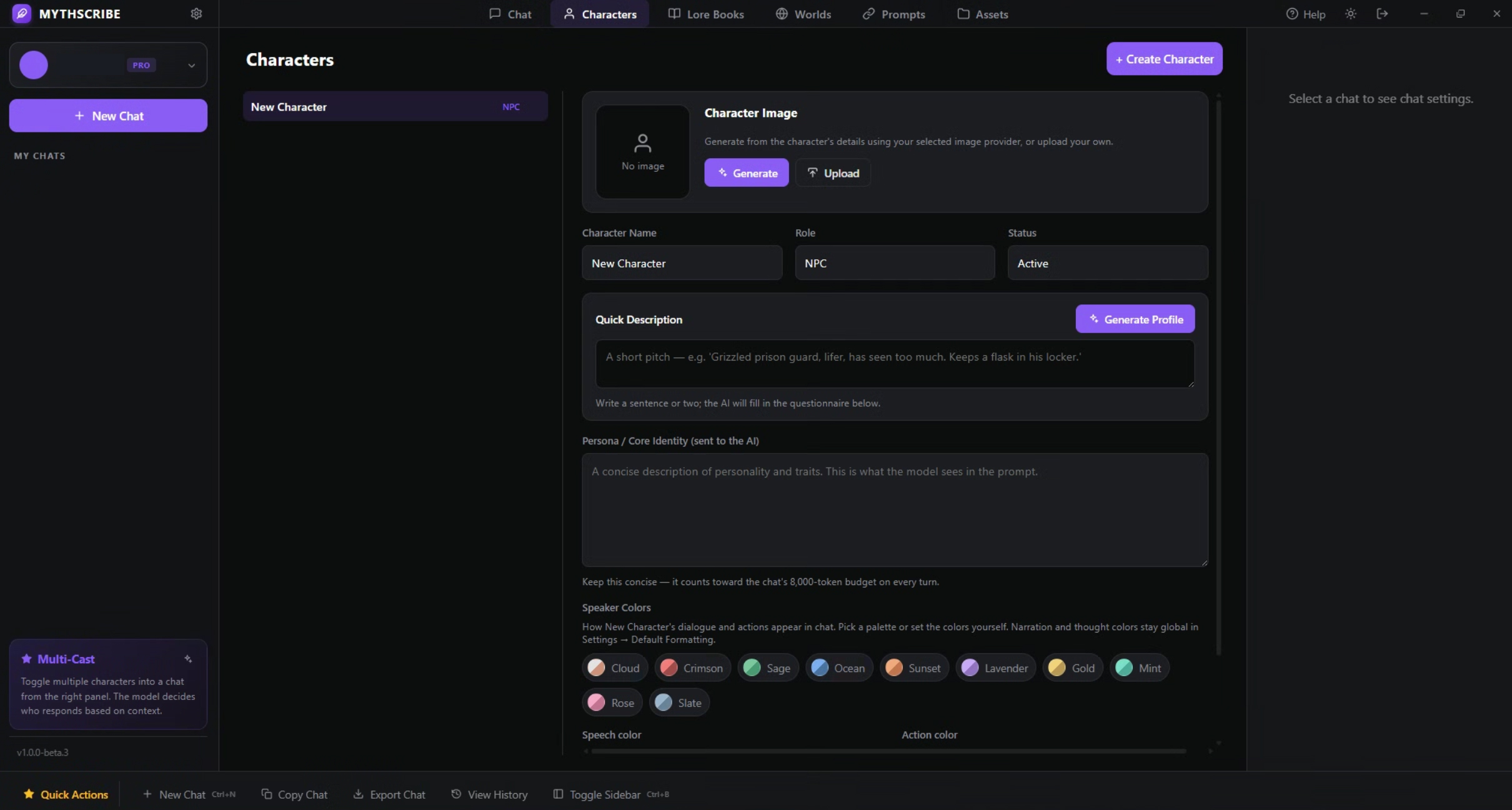
Go to the Characters tab and click + Create Character. You have two paths:
- Quick: Write a one-sentence pitch in Quick Description — "grizzled prison guard, lifer, keeps a flask in his locker" — and click Generate Profile. The AI fills out a questionnaire and compiles a persona for you.
- Detailed: Fill the Persona field directly. Whatever's in Persona / Core Identity is what the model actually sees on every turn, so keep it tight.
Optionally:
- Click Generate under the avatar to give the character a portrait.
- Pick a Speaker Color palette so their dialogue stands out in the transcript.
2. (Optional) Build a World and Lore
- Worlds tab: Create a "world" with a global system prompt — the setting, tone, and rules every chat in this world inherits.
- Lore Books tab: Create entries like
keyword: description. When that keyword appears in recent dialogue, Mythscribe slips the description into the prompt. Use this for places, factions, items, NPCs you don't want to fully roleplay.
3. Start a Chat
- Click + New Chat in the sidebar.
- In the right-hand panel, add one or more characters to Active Characters and (optionally) attach a World and Lore Books.
- For each character, open the menu (
⋮) and toggle Player-controlled for the ones you want to voice. Everyone else is voiced by the AI. - Type into the composer and hit Send (or
Ctrl+Enter).
That's the whole loop.
Multi-Character Group Chats
This is the feature that makes Mythscribe different from a one-on-one chatbot.
- Turn order is the order in the Active Characters list. Use the up/down arrows on each card to rearrange it.
- Each player types in turn before the AI speaks. If Alice, Bob, and Charlie are all in the scene and Alice + Bob are player-controlled, the flow goes:
- You type as Alice → press Send.
- You type as Bob → press Send.
- The AI now generates as Charlie, having read both Alice's and Bob's lines.
- Turn rotation lands back on Alice. Repeat.
- The "Speaking as" dropdown appears in the composer when multiple player-controlled characters exist. It tracks whose turn it is and you can override it freely.
- NPC chains: if two NPCs are adjacent in the rotation, both speak in sequence before control comes back to a player. The AI is told who it is, who it isn't, and what every other character just said.
- Set as up-next: any character's menu has a "Set as up next" option if you want to break out of order for a beat.
Solo play (one player character, several NPCs) still works exactly like a normal chat — this just gracefully scales up to roundtables.
The Composer
Beneath the message field are four tool buttons:
| Icon | What it does |
|---|---|
| Sparkles | Enhance — rewrites your draft with more vivid prose, keeping intent. |
| Image | Illustrate — generates an image for the most recent AI reply. |
| Feather | Extend — continues your draft with 1–3 more sentences. |
| Wand | Generate My Response — drafts a reply as your character, which you can then edit and send. |
Use Enhance and Extend when you're stuck mid-sentence. Use Generate My Response when you want to see what the AI thinks your character would do — but always read it before sending; it doesn't always know your character as well as you do.
Branching, Regenerating, and Editing
Every AI message and every user message has hover actions:
- Regenerate an AI reply — creates a sibling at the same parent. Flip between siblings with the
‹ N/M ›chevrons. - Resend a user message — same idea on the user side. The old reply remains accessible by switching branches.
- Edit any message in place — your edit becomes a new branch, so you don't destroy what was originally said.
- Delete a message and its entire downstream subtree.
Branching means experimentation is cheap. If a turn goes somewhere flat, regenerate; if a whole side-path stops working, switch back to the previous branch and try a different prompt.
Long Stories: Summary and Lore Auto-Update
Mythscribe holds 8000 tokens of context per turn. When prompts approach that ceiling:
- Rolling Summary kicks in automatically and writes a dated paragraph capturing the latest stretch of dialogue. You can read, edit, or trigger it manually from the Info panel.
- Auto-Lore (optional toggle) periodically scans dialogue for new world or character facts and adds them to your active lore book — so the model keeps remembering things you've established mid-scene.
Both features are off-by-default per chat; turn them on in Info → Automation.
Auto-Play
Want to read instead of write for a while? Turn on Auto-Play under Info → Automation and set a number of laps. Mythscribe will speak for every character in rotation — the AI ghost-writes your player turns too — for that many full passes around the table. Stop anytime with the Stop button.
This is great for letting an established scene play out unattended, or for kickstarting a flat moment.
Privacy
- All chats and library data are encrypted with AES-256-GCM, keyed by your password through PBKDF2 (100,000 rounds). Without your password, the vault is opaque.
- The only network calls Mythscribe makes are to aihorde.net (and civitai.com if you've turned that provider on) — for model lists and generation requests. Nothing is logged or relayed anywhere else.
- Generated images are stored inside your encrypted chats, not as loose files on disk.
If you'd like to inspect or audit the network behavior, every outbound call is routed through the Electron main process — there are no hidden fetch() calls in the renderer.
Troubleshooting
"The model returned no text." Usually means the prompt confused the model or the worker timed out. Try Regenerate first. If it happens repeatedly, pick a different text model in Settings — some are better at long-form roleplay than others.
"Queue: 12" in the status indicator means you're waiting for a Horde worker. Queue times are usually under a minute on the guest key; registered users get priority.
Images failing. Check that your selected image model has a healthy worker count (the dropdown shows count next to each model). For Civitai, confirm your API key has image-generation entitlements.
Lost your password? There is genuinely no recovery path. Create a new profile and start over. Sorry — the encryption is real.
Support the Project
Mythscribe is built and maintained by one person, in stolen evenings. It will always be free to download and use; the AI Horde itself runs on volunteer GPU time, so the whole stack costs you nothing.
If Mythscribe earns a spot in your writing routine and you'd like to throw something in the tip jar to keep the late-night patches coming, donations are gratefully accepted but never expected. Use it, share it with a friend who'd enjoy it, and tell me what you'd like to see next.
Happy writing.
Download
Click download now to get access to the following files: